Put the right work in view.
Choose fields, filters, table columns, board stages, dashboards, and record layouts. Give an account manager a review queue and a delivery team a view of its next actions.
A Canadian company.Canadian and U.S. support. No overseas outsourcing.
Your data. Your team.Build the tools your business actually needs. Shape your data, workspace, workflows, and AI through settings and visual builders. Add bespoke interfaces and logic with the SDK—all on the same Grovana foundation.
Accounts and contacts are a starting point. Add the sites, assets, agreements, engagements, or other records your business works with.
Define the fields you need and connect the records that belong together. An agreement can relate to an account, an asset to a service location, and a project to the people responsible for it.
Build the screens and processes around that model so your team can work in terms that make sense to them.
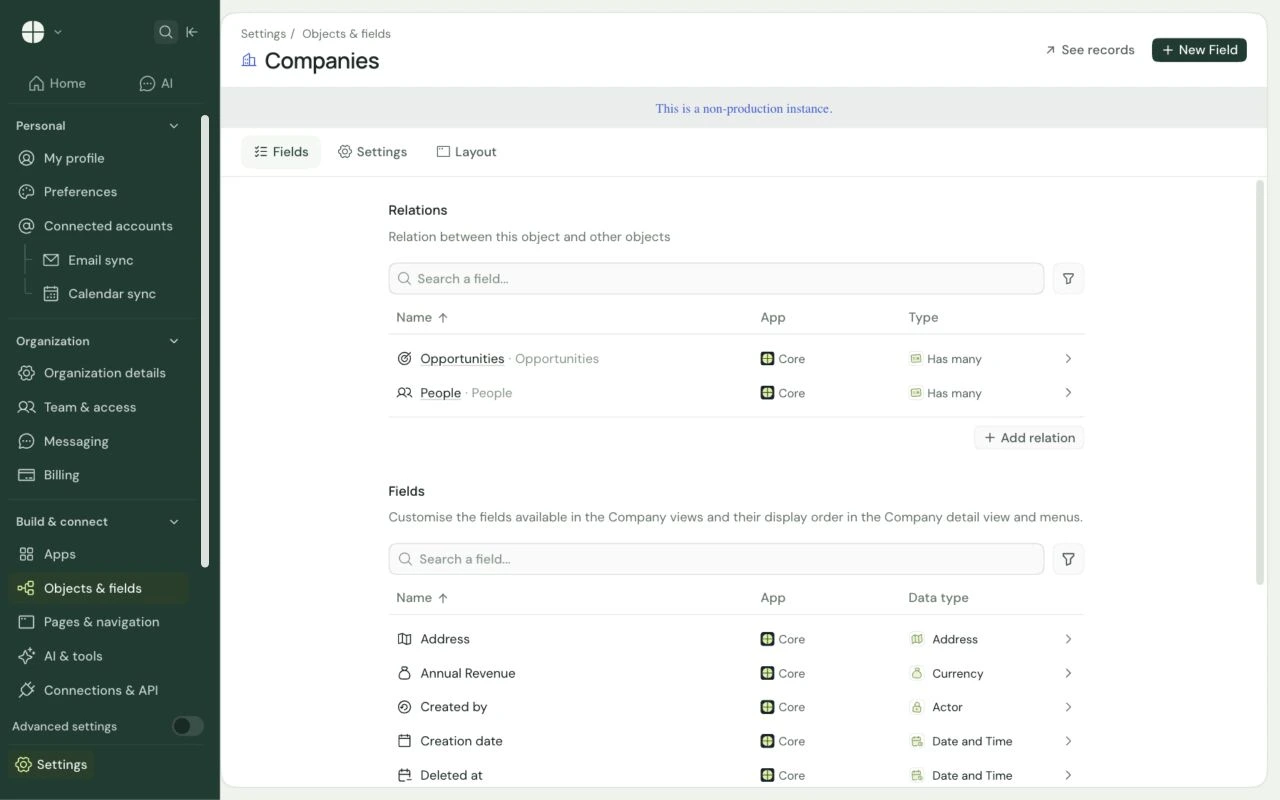 View full screen
Go from the information you collect to the screens people use and the actions that move work forward.
Choose fields, filters, table columns, board stages, dashboards, and record layouts. Give an account manager a review queue and a delivery team a view of its next actions.
Connect record triggers, conditions, assignments, and actions in the visual builder. Add code steps for logic that is specific to your business.
Give skills and agents your instructions, selected models, permitted tools, and record context. Shape account briefs, discovery, and draft follow-up around your process.
Use the developer SDK to bring custom records, screens, business logic, and AI together in one application. Give it a place in the workspace and package the pieces for installation.
Your app can work with existing customer records and the platform’s permission model. Define who can see and do what, then build the experience around the job.
Connect the customer, approved scope, milestones, owners, and checklist. Build a handoff screen that brings the team’s next actions together.
Make it yours: your onboarding stages, required information, review steps, and handoff rules.
Connect accounts, locations, assets, and service agreements. Build a useful view of what a customer has and the conversations that follow.
Make it yours: your asset types, service fields, account views, and review process.
Bring agreement dates, account owners, opportunities, and review notes together. Configure follow-up workflows and AI preparation for the account team.
Make it yours: your review cadence, pipeline stages, assignment rules, and AI instructions.
Examples of apps you can configure or build. Scope, AI setup, custom development, and integrations are confirmed during planning.
Create objects, fields, and relationships for your data. Configure tables, boards, dashboards, record layouts, roles, and workflows. Give AI skills and agents your own instructions and permitted tools. Use the SDK for custom interfaces, server-side logic, and packaged applications.
Many data-model, view, layout, and workflow changes use workspace settings and visual builders. Your team can start there. Bespoke interfaces, complex business logic, and new integrations use the developer SDK and APIs.
Yes. An app can combine its own records, relationships, views, navigation, custom interfaces, server-side logic, and AI capabilities. Package those pieces together with the SDK and install them in a compatible workspace. Development and setup depend on the app you need.
Apps can extend existing records or add their own, connect them through relationships, and use the platform’s APIs and permission model. Define access for the app and its users so the tool works with the records each person is allowed to use.
The onboarding hub, asset and service app, and renewal workspace shown here are examples of what you can configure or build. We confirm the available starting points, configuration, development, and integrations for your project.
Yes. Define which system owns each record, then connect the surrounding workflow with supported apps, APIs, or webhooks. Integration scope depends on provider access and validation. Accounting, dispatch, and other specialist operations can stay in their existing systems.
Bring the workflow you want to shape or the app you wish existed. Let’s build it on Grovana.
Book a demo