A Canadian company.Canadian and U.S. support. No overseas outsourcing.

Your data. Your team.
Grovana vs. Microsoft Dynamics 365

Keep your Microsoft tools. Choose how you build around them.

Compare Dynamics 365 Sales with a flexible workspace that connects to the Microsoft tools your team already uses.

WHY CONSIDER MICROSOFT DYNAMICS 365

A different starting point.

Dynamics 365 Sales brings sales automation and Microsoft 365 connections together, with Copilot and customisation options by edition. It is worth evaluating when the wider Microsoft business-app ecosystem is central to your operations.

Explore Microsoft Dynamics 365’s offering ↗
WHY CONSIDER GROVANA

Make the workspace yours.

You want to keep Outlook, Teams, and Bookings while building your own account, renewal, or onboarding process in Grovana.

Explore custom tools ↗
THE PRACTICAL DIFFERENCES

What matters for your team?

Scroll sideways to compare both platforms.

Grovana and Microsoft Dynamics 365: capabilities and buying considerations
ConsiderationMicrosoft Dynamics 365Grovana
Starting pointSales software in the Dynamics 365 and Microsoft ecosystem.Custom business tools connected to your email, calendar, records, and AI.
Microsoft connectionsMicrosoft 365 interoperation, with Copilot capabilities depending on edition.Outlook email and calendar, Teams meeting links, and Bookings appointments through Microsoft calendar.
Custom apps and AICustom apps and automation may require Power Apps or Power Automate licenses. Agents use Copilot Credits.Custom objects, workflows, SDK apps, configured AI models, and MCP connections.
What to priceSales licenses, Power Platform requirements, agent usage, and implementation.Review workspace setup, Microsoft account permissions, integrations, and AI usage. Pricing is confirmed during a demo.

Competitor information reviewed September 19, 2026. Plans and features can change. Grovana capabilities require the appropriate setup; scope and pricing are confirmed before you commit.

MORE THAN A CRM

The things you manage deserve a place of their own.

Build around clients, agreements, properties, projects, or the next idea your team brings forward. Connect those records to your views, workflows, and AI.
Explore the actual Grovana product
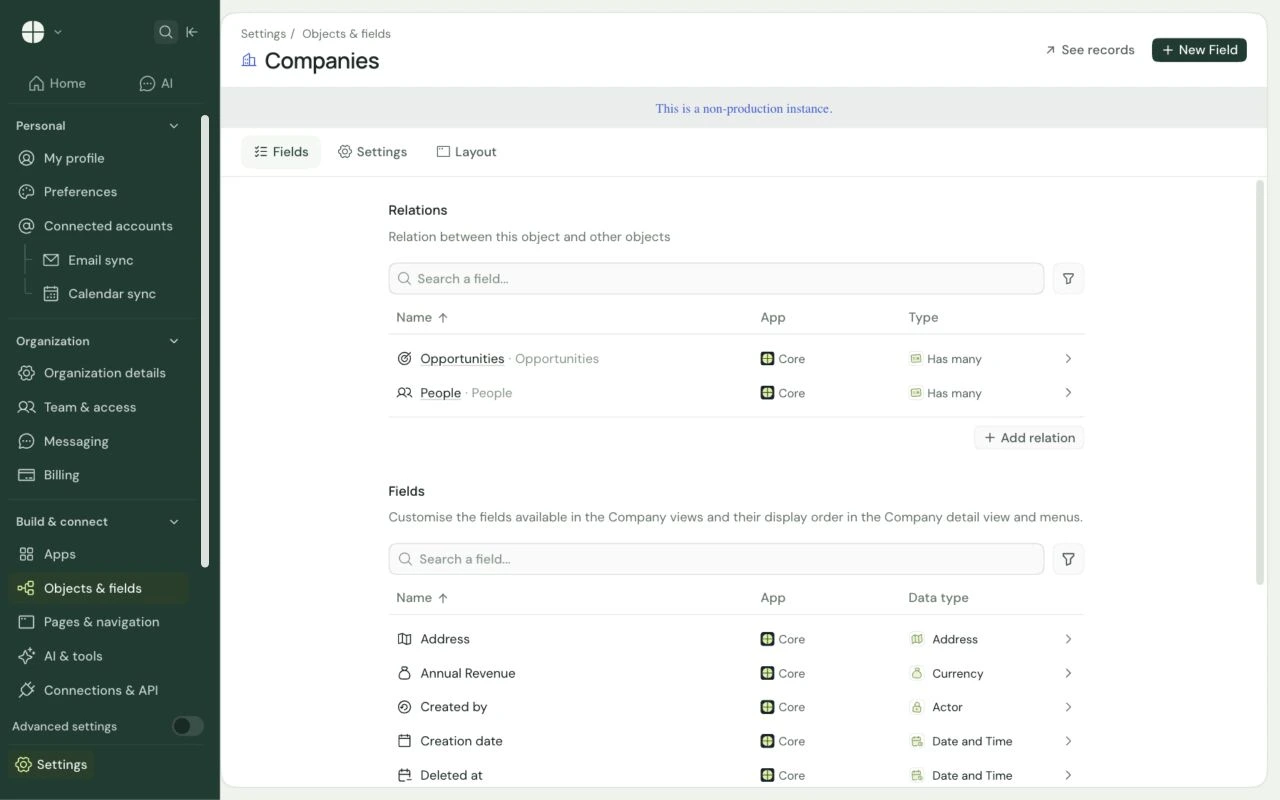
Grovana staging Companies fields settings showing relationships to Opportunities and People, plus Address, Annual Revenue, and other company fields.View full screen
Grovana staging · Objects & fields settings · company fields and relationships
Grovana custom data modelOpen original ↗
Grovana staging Companies fields settings showing relationships to Opportunities and People, plus Address, Annual Revenue, and other company fields.

Grovana staging · Objects & fields settings · company fields and relationships

BRING THESE TO YOUR DEMO

Make the decision concrete.

Use the same business process to evaluate both options.

  1. 01
    Which requirements need additional Microsoft licenses?
  2. 02
    Do you need the full Dynamics ecosystem or a focused workspace?
  3. 03
    How will account permissions and external AI processing be configured?
BUILD AROUND YOUR BUSINESS

Your process.
Your next app.

Bring the workflow you want to shape or the app you wish existed. Let’s build it on Grovana.

Book a demo